
GPT Image 2.5
Explore photo edits with Flare or Sunburst mode, with 1K, 2K, and 4K output options.
Nano Banana 2.1 is Google's AI image model for realistic photo edits, clearer in-image text, and consistent subjects, guided by natural-language instructions.
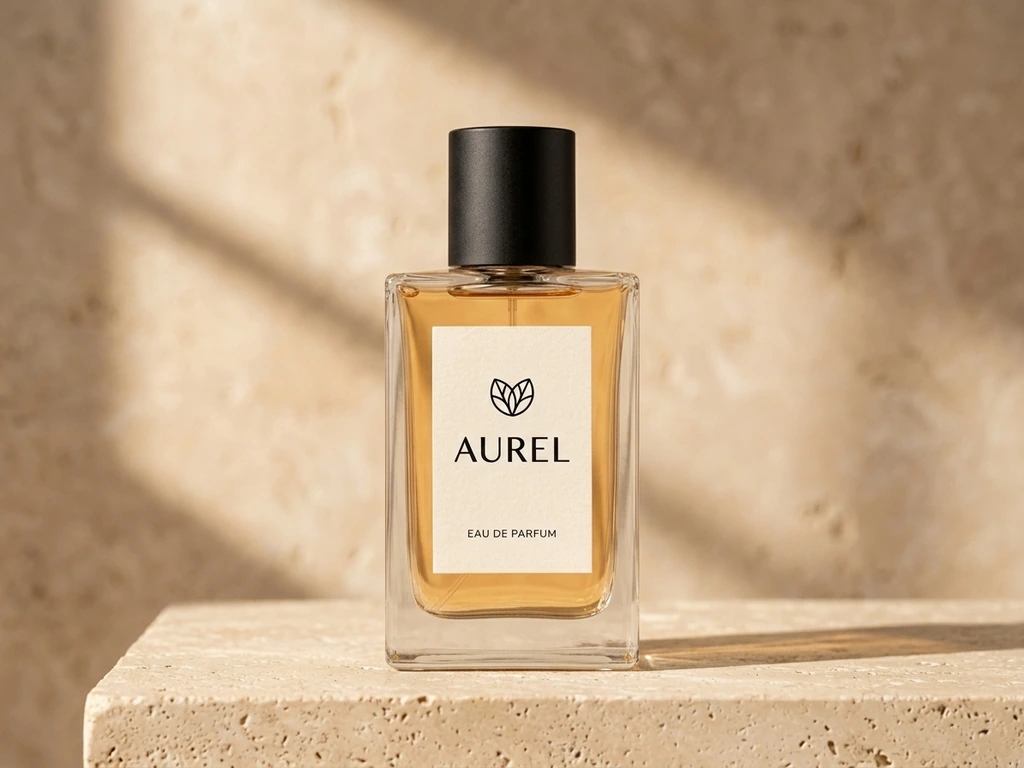
Nano Banana 2.1 supports image generation and editing. On EzVideo, upload an existing photo and describe what to change or preserve. Choose 1K, 2K, or 4K output, then review faces, labels, and text before downloading.
Read Google's model overviewMove a perfume bottle from a plain gray backdrop to a warm travertine setting. Add directional window light and natural shadows while keeping the bottle and its label recognizable.
Give product listings and fragrance campaigns a warmer look without arranging a new studio shoot.
Loading comparison…
Shift a cool studio portrait into golden-hour light. This edit keeps the blonde model, black dress, and cognac leather handbag in the same composition while warming the face, fabric, and leather.
Explore a new lighting mood for fashion campaigns while keeping attention on the model and the bag's details.
Loading comparison…
Build a visual story around the EzVideo logo with a cream-and-green palette, readable headlines, and a curved filmstrip showing product, travel, and anime scenes.
Combine brand artwork, feature labels, and a clear call to action in one promotional graphic for your website or social channels.
Loading comparison…
Turn a monochrome drawing of a traveler and her cat into a warm coastal illustration. Add a sage jacket, orange scarf, teal sea, and terracotta rooftops while retaining the original lines and composition.
Develop color treatments for illustrated stories, thumbnails, and anime artwork from the same source drawing.
Loading comparison…
Start with one image and a clear request. Nano Banana 2.1 is selected for you in the editor above.
Choose a clear photo or illustration you have permission to edit. Keep important faces, product details, and text visible.
Explain what to change and what to keep. Try a prompt from the examples above, then adjust it to your image.
Select an aspect ratio and 1K, 2K, or 4K output. Check the estimated credits before generating.
Inspect the result, including faces, edges, and text. Download the finished image or adjust your prompt and try again.
Use your daily free allowance and available check-in rewards for a total of 90 credits. At 3 credits per 1K image, that is up to 30 Nano Banana 2.1 images to explore backgrounds, lighting, and styles.
Sign in to claim check-in rewards. The 30-image allowance assumes all 90 credits are used for Nano Banana 2.1 at 1K. Higher resolutions and other tools use different amounts. Check the displayed cost before generating; affordable paid options are available when you need more.
View plans and creditsTry the same photo and prompt with another model to compare results. Each model has its own output settings and credit cost.
Explore photo edits with Flare or Sunburst mode, with 1K, 2K, and 4K output options.

Explore product visuals and creative designs with 1K or 2K output.
Try another visual style or change a scene with a simple editing prompt.
Make everyday photo edits, change backgrounds, and use an optional second image to guide your edit.
Yes. EzVideo offers a total of 90 daily free credits through the daily allowance and available check-in rewards. That is enough for up to 30 Nano Banana 2.1 images at 1K when all credits are used for this model. Sign in to claim check-in rewards. Paid options are available if you need more credits.
Nano Banana 2.1 currently costs 3 credits at 1K, 5 credits at 2K, and 7 credits at 4K on EzVideo. The editor shows the estimated cost for your chosen settings before you generate.
Yes. Upload your photo and describe the new background, surface, and lighting. Tell the model which subject and details should stay the same. Check the result for changes to edges, shadows, and small product details.
The model is designed for improved subject consistency. A clear source image and a prompt that specifies what to preserve can help, but faces, logos, labels, and fine details may still change. Compare important details with the original image.
You can ask for a new layout and specify the exact words in quotation marks. Short, clearly placed text is a useful starting point. Always review spelling, numbers, and dates before publishing the design.
Name the change, describe the desired look, and list what must stay the same. For example, ask for a beige studio background with soft light while keeping the product's shape, color, and label unchanged. Start with one focused edit before adding more requirements.
Restyle a product background, warm up a fashion portrait, build a brand poster, or color your line art. Start with your image and a clear prompt.